
Choose the right one Powerlinkcable for your BeoLab
Incorrect cable may cause noise or the speaker display may not work. Find your speaker in the table and see which type you need
How do I choose the right one? Power Link cable
We hope this text can help you choose the right one. Power Link cable for your B&O products and Neo products.
We advise primarily in the choice of cables, which include Neo products where we have experience and can provide guidelines. Most people choose based on price and quality - but we think you should also think about the purpose.
| Beolab | Note | MK2 | MK3 | Connector type |
|---|---|---|---|---|
| BeoLab 1 | Slim floor model with powerful sound, active two-way speaker. | X | X | DIN 8 pin |
| BeoLab 2 | Active subwoofer designed to complement other Beolab speakers. | X | X | DIN 8 pin |
| BeoLab 3 | Compact ball speaker with ICEpower and acoustic lens. | X | DIN 8 pin | |
| BeoLab 4 | Smaller pyramid-shaped speaker, often used as a rear channel. | X | DIN 8 pin | |
| BeoLab 5 | High-end speaker with acoustic lens and full digital signal processing. | X | DIN 8 pin | |
| BeoLab 7 | Soundbar (several versions: 7-1, 7-2, 7-4, 7-6) often with BeoVision 7 or Neo 7 | X | DIN 8 pin | |
| BeoLab 8 | Compact and powerful as a surround, stereo or standalone speaker | X | RJ45 | |
| BeoLab 9 | Active three-way speaker with acoustic lens, medium size. | X | DIN 8 pin | |
| BeoLab 10 | Center speaker with acoustic lens, used for surround. | X | DIN 8 pin | |
| BeoLab 11 | Wall-mountable subwoofer with sculptural design. | X | X | DIN 8 pin |
| BeoLab 12 | Slim wall speaker in several variants (12-2, 12-3, 12-4). | X | X | RJ45 |
| BeoLab 14 | 5.1 surround system with satellites and subwoofer. | X | RJ45 | |
| BeoLab 17 | Compact wireless speaker with great performance. | X | RJ45 | |
| BeoLab 18 | Wireless design classic with slatted front (wood or aluminum). | X | RJ45 | |
| BeoLab 19 | Wireless subwoofer with geometric design. | X | RJ45 | |
| BeoLab 20 | Large wireless speaker with powerful sound and acoustic lens. | X | RJ45 | |
| BeoLab 28 | Slim floor-standing speaker with streaming, active room adaptation. | X | RJ45 | |
| BeoLab 50 | High-end DSP speaker with motorized acoustic lens. | X | RJ45 | |
| BeoLab 90 | Top model with extreme technology and 360° sound control. | X | RJ45 | |
| BeoLab 3000 | Flat wall speaker with aluminum cabinet and built-in display panel | X | DIN 8 pin | |
| BeoLab 4000 | Compact active speaker in aluminum, often used on a wall or stand. | X | DIN 8 pin | |
| BeoLab 5000 | Flat wall speaker with aluminum cabinet and built-in display panel | X | DIN 8 pin | |
| BeoLab 6000 | Slim column speaker in aluminum with front fabric. | X | DIN 8 pin | |
| BeoLab 6002 | Updated version of the slim BeoLab 6000 column speaker. | X | X | DIN 8 pin |
| BeoLab 8000 | Classic slim floorstanding speaker in aluminum with pencil base | X | DIN 8 pin | |
| BeoLab 8002 | Updated version of the classic BeoLab 8000 floorstanding speaker. | X | X | DIN 8 pin |
| BeoLab Penta MK 2 and 3 | Large column speaker with built-in amplifier and display. | X | DIN 8 pin | |
| ML/MCL Converter | X | DIN 8 pin | ||
| BeoLink Passive | X | DIN 8 pin |
Read more about B&O Beolab speakers here
What is a Power Link cable
Bang & Olufsen has for many years used PowerLink cables between the products. Neo products also use Power Link cables between the Neo and B&O products. Power Link The cable and standard were developed at B&O and are only used between B&O products.
Do you therefore have Powerlink cables from before, they can probably be used again.
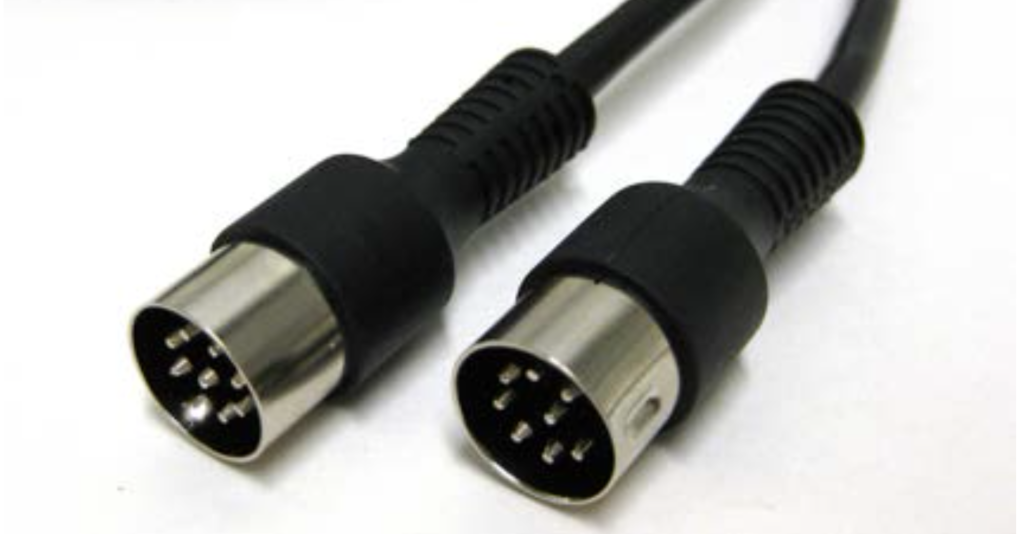
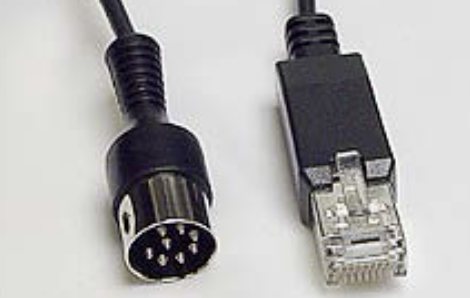
However, at some point B&O decided to switch from the 8-pole DIN cable to RJ45 connector.
You must therefore be aware of which types of plugs are to be used.
which Powerlink Are there cables?
There are typically 3 types of Bang & Olufsen Power link cable.
Powerlink cable model 1 (MK I or Mk 1)
The cable contains 6 wires, of which 2 pairs are twisted pair and shielded (right and left channel). Furthermore, the entire cable is shielded in one. This was the first variant used by B&O products – a powerlink cable from b&o.
Powerlink cable model 2 (Mk II or Mk 2)
The cable contains 8 wires, of which 2 pairs are shielded (right and left channel), 1 wire is shielded (data traffic) and a wire for Overload signal, a wire for speaker on/off and finally a wire for Power-up. The entire cable is shielded in one.
The cable is typically used for speakers with a display. These are B&O speakers, such as BeoLab 3000, BeoLab 4500, BeoLab 5000, Penta MK II and Penta MK III.
The cable is also used for amplifiers, such as the ML/MCL Converter and BeoLink Passive.
The above speakers and amplifiers must use specific wires in cable. Pin 6 on the connector is a Data pin, which is required to be able to use the display on the speaker. Pin 1 of the connector is on / off the speaker and finally pin 8 is detection of overload on the amplifiers.
Powerlink cable model 3 (Mk III or Mk 3)
The cable contains 4 wires and a ground wire (screen). Each channel (right and left) is connected to the screen as well as a wire for speaker on/off. The original B&O cable of this type has the name Power Link Cable MKIII.
The cable is typically used for speakers that do not require a data connection. See the table below to select the correct cable.
Previous Beolab speakers have older switch-mode power supply built in, which makes noise. That's why they need MK2 cables with extra good shielding and can't make do with MK3 cables.
It is also not sensible to use "Powerlink cable model 3” cable over 10 meters long. It also causes noise in the speaker.
Why exist "Powerlink cable model 3” actually, when problems arise with the cable. This is because the cable is thin – typically with a diameter of 2,5 mm – and this makes installation easier – it is easier to hide behind moldings and so on.
Powerlink MK2 vs. Powerlink MK3 – What's the difference?
Powerlink MK2 (MKII) – Fully assembled cable
Properties:
- Compatible with Powerlink-speakers or models with display (BeoLab 5, BeoLab 4500, BeoLab 5000, etc.).
- 8 internal conductors – full support for audio, data and power.
- Supports data communication to speakers with displays so that information is displayed correctly.
- Suitable for MasterLink-integration.
- Better shielding against noise and electrical interference.
Typical use:
If you have BeoLab speakers with display.
If you have Beolab 5
If you use ML/MCL Converter.
If you want the most versatile solution that supports all features.
See the table below.
Powerlink MK3 (MKIII) – Lightweight version
Properties:
- Compatible with B&O speakers without display.
- 4 internal conductors – left/right audio and power on/off only (no data communication).
- Slimmer and more flexible design (thickness approx. 2,5 mm).
- Easy to hide in cable ducts and furniture.
Typical use:
If you have BeoLab speakers without a display.
If you want a thinner and more flexible cable for discreet installations.
If you do not need data communication for the speaker display.
Power link plug connection and explanation
| DIN 8 Pin | RJ45 Pin | Description | Mk 1 | Mk 2 | Mk 3 |
|---|---|---|---|---|---|
| 1 | 5 | Power Up | √ | ||
| 2 | 3 | Signal GND | √ | √ | √ |
| 3 | 8 | Audio Left Out | √ | √ | √ |
| 4 | 4 | Speaker On/Off | √ | √ | √ |
| 5 | 6 | Audio Right Out | √ | √ | √ |
| 6 | 2 | Data Signal | √ | √ | |
| 7 | Shield | Data GND | √ | √ | |
| 8 | 1 | Overload | √ |
Neo 7 Adapter
Do you have a Beovision 7 system and have updated the TV to a new one, where you use Neo 7 Adapter. read about Neo 7 Adapter here
Here you can use all cable types – Mk 2 and Mk, if you only have the Beolab 7 speaker connected. The data signal is not used, so Mk 1 and Mk 2 are not necessary.
Do you need to connect multiple speakers to Neo 7, then see the table below. Unfortunately, each speaker type from B&O has its own requirements for MK2 or MK3 cable.
Neo Radio
Do you use Neo Radio from Neomesteren, then you must connect a Power Link cable between Neo Radio and your B&O product. Read more about Neo Radio here.
Here you must use an MK2 cable, as Neo Radio uses the data connection between the B&O product and Neo Radio. This is important. MK3 cable cannot be used.
FAQ – All about B&O powerlink cables – MK2 and MK3 type/model
Powerlink MK2 and MK3 both use the classic 8-pin DIN-connectors, but they are not built exactly the same.
MK2 has several connections and supports, among other things: Powerlinkdata used by some older Bang & Olufsen speakers.
MK3 is a simpler cable type that can be used for many BeoLab speakers where these extra signals are not needed.
Find your BeoLab speaker in the table above. Here you can see which cable type we recommend for each speaker.
If both MK2 and MK3 are marked, both types can be used.
In many installations, MK2 can be used even if the speaker does not need all the connections in the cable.
However, this does not mean that MK2 is necessarily the best choice for all installations. We recommend following the table above.
Some older Bang & Olufsen speakers use Powerlink-connection for more than just sound and on/off. This applies, among other things, to models with a display, where data is also transmitted Powerlink-data.
A cable that supports these signals must be used.
We recommend Powerlink MK2 for BeoLab 5BeoLab 5 has special requirements for Powerlinkconnection, and therefore you should not use a regular MK3 cable.
The classic Bang & Olufsen Powerlink-plug is a round plug with 8 pins, also called an 8-pin DIN-connector.
Although MK2 and MK3 may have the same type of connector, the connections inside the cables are different. Therefore, you cannot choose the cable type based on the appearance of the connector alone.
Normally, choosing between a properly manufactured MK2 and MK3 cable will not damage the speaker. However, if the speaker requires signals that the cable does not carry, certain features may be missing or the installation may not work as expected.
The list is constantly being expanded. If your Bang & Olufsen speaker is not listed, please contact us with the model name. We will help you find the right one. Powerlink cable.
Yes. On newer Bang & Olufsen products there is Powerlink also with RJ45 connectors. It is therefore important to distinguish between Powerlinkthe signal and the physical type of connector.